
Features to Bid Smarter and Build Faster
Features to Bid Smarter and Build Faster
TakeCost connects takeoffs, quantities, pricing, and proposals in one workflow built for real contractors.
FEATURES
All the tools you need to measure, price, and estimate faster
From on-screen takeoffs to pricing and proposal-ready outputs, TakeCost gives your team one connected workflow from plans to estimate.
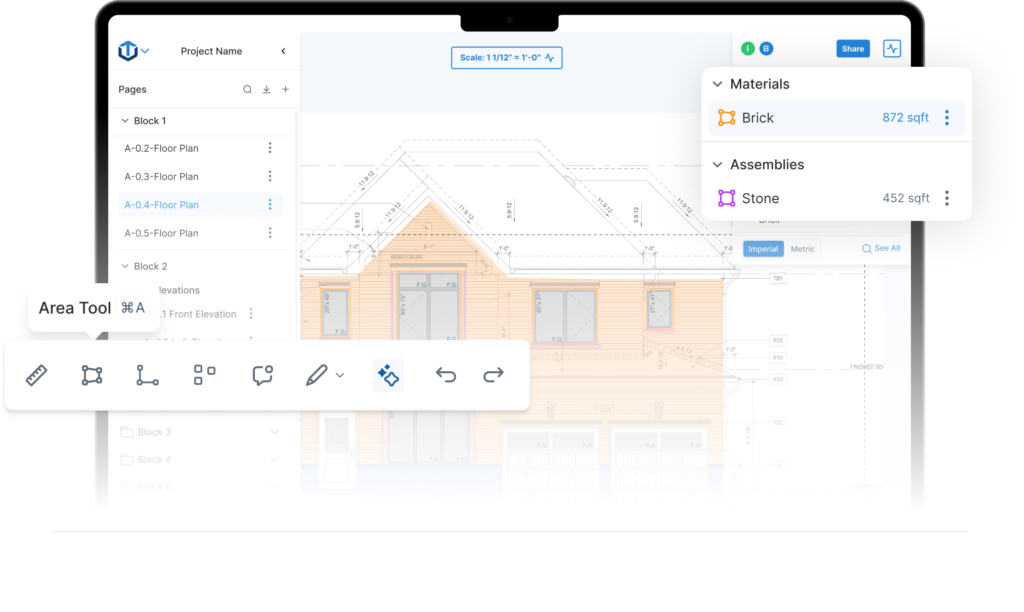
On-Screen Takeoff Tools
Measure areas, lengths, counts, and elevations directly on plans with tools built for real estimating workflows.
- Area, linear, and count tools
- Elevation takeoffs
- Scale, rotate, and organize drawings
Connected Pricing
Keep quantities tied to pricing, labor, and scope so estimates stay aligned as projects evolve.
AI-Assisted Workflows
Reduce repetitive manual work with tools that help speed up elevation takeoffs and drawing review.
Collaboration & Output
Share takeoffs, review quantities with your team, and export clean summaries ready for estimating.
A closer look at the tools behind TakeCost
Explore how TakeCost helps your team measure faster, organize quantities, and move toward cleaner estimates.
On-screen tools built for real takeoffs
Measure directly on plans with tools that help estimators move quickly through drawings and stay organized as scope builds.
- Measure areas, lengths, counts, and elevations directly on plans
- Scale, rotate, and organize drawings for faster navigation
- Keep scope visible and structured as your takeoff grows

AI features that reduce repetitive work
Speed up common estimating tasks with tools designed to cut down on manual effort and help your team move faster.
- Auto sheet naming for faster project setup
- AI-assisted elevation takeoffs and symbol recognition
- More automation where it actually saves time

Keep your team on the same page
Share takeoffs, align on quantities, and keep project information accessible without sending files back and forth.
- Cloud-based access for connected team workflows
- Share projects and quantities more easily
- Reduce handoff friction across estimating work

Turn takeoffs into cleaner estimating output
Keep quantities tied to pricing and move toward proposal-ready information without rebuilding the same job in multiple tools.
- Connect quantities to pricing groups and scope
- Keep estimates more organized as projects evolve
- Export cleaner summaries and outputs for the next step

See TakeCost in Action
Experience our intuitive interface and powerful features firsthand.
Watch 2‑Minute DemoFrom AI takeoff through to client‑ready proposals, TakeCost keeps everything in one place.
Start now and price
more projects with ease!
Upload your drawings now - No downloads required
Only upgrade if needed, with no commitments
Your files are saved in the cloud for easy access
Mobile Friendly
Free Takeoffs Forever
No Credit Card Required
Frequently asked questions
We have put together some commonly asked questions
What is TakeCost?
TakeCost is a digital takeoff and estimating tool built by contractors for contractors. Upload plans, measure materials, build estimates, and create proposals all in one place.
Is TakeCost free for life?
Yes! TakeCost will always offer a free plan. You can start 1 new project per month and keep access to all your past projects. We’re committed to helping new and small construction professionals grow without the pressure of a paid subscription.
Do I need to install anything to use TakeCost?
No downloads needed. TakeCost is 100% cloud-based—just log in from any browser and start measuring.
Can I share my projects with others?
Yes. You can invite team members to view or collaborate on projects, depending on your plan.
Can I book a demo?
Yes! You can book a 30-minute demo with our team using this link: https://calendly.com/takecost/demo
How secure is my data on TakeCost?
Your data is safe with us. We run free daily backups of all user data and follow strict internal security and privacy protocols. From encrypted storage to limited access controls, TakeCost is built to keep your project files and measurements protected at all times.
What file types does TakeCost support?
TakeCost supports multi-page and single-page PDF plans, plus common image files like JPG and PNG. If you’re uploading an image, just provide one known measurement to set the scale and you’re good to go. Perfect for scanned drawings, sketches, or marked-up site photos.
Can I switch between Imperial and Metric units?
Yes. TakeCost supports both Imperial and Metric units. You can switch anytime—your measurements and scale will automatically adjust to match.
What happens if I hit my free project limit?
Once you reach 2 new projects in a month, you can either upgrade to a paid plan or wait until the next month resets. All your past projects remain accessible.
How do I contact customer support?
You can reach our customer support team through the following channels:
- Submit a Support Ticket – Visit our Help Center and click “Submit a Ticket”. Provide details about your issue, and our team will respond promptly.
- Use Our Live Chat – Look for the chat icon on our website for real-time assistance from a support agent.
- Email Us – Send your inquiries to takecost@congic.com, and we’ll get back to you shortly.
- Call Us – Reach our support team directly at 1-866-377-1787 for immediate assistance.
We’re here to help with any questions or issues you may have!